Every millisecond your site delays rendering content, processing a payment, or executing a script burns through potential profit. Today, website speed is no longer just a technical metric for developers — it is a core business KPI that directly governs your bottom line.
When a prospective buyer lands on a sluggish page, their patience vanishes immediately. Rather than fighting lag, layout shifts, or unresponsive buttons, they hit the back button and spend their money with your competitor. Speed builds trust, whereas latency silently destroys your conversion funnel.
Slow site load times drive bounce rates up, kill conversions, and trigger search engine ranking penalties. Optimizing technical factors like Core Web Vitals, media delivery, and third-party scripts restores user trust and protects your bottom line.
What Is Web Performance and Why Does It Matter for Revenue?
Web performance refers to how quickly and smoothly a website loads, responds to user inputs, and renders visual elements in a browser. It is the technical backbone of digital user experience.
Historically, website speed was treated as a secondary priority behind design and feature set. However, modern consumers expect digital interactions to feel instantaneous. When site responsiveness fails to meet these expectations, the impact on revenue is severe.
Human perception plays a key role here. Research shows that user focus declines sharply after just one second of waiting. By two seconds, a user experiences a conscious interruption in their thought process. Pass three seconds, and impatience drives them away.
Latency also damages your brand credibility. Users frequently associate laggy pages with poor security protocols, questionable professionalism, and unreliable service — especially during payment processing.
The Funnel Breakdown: How Latency Destroys Conversion Rates
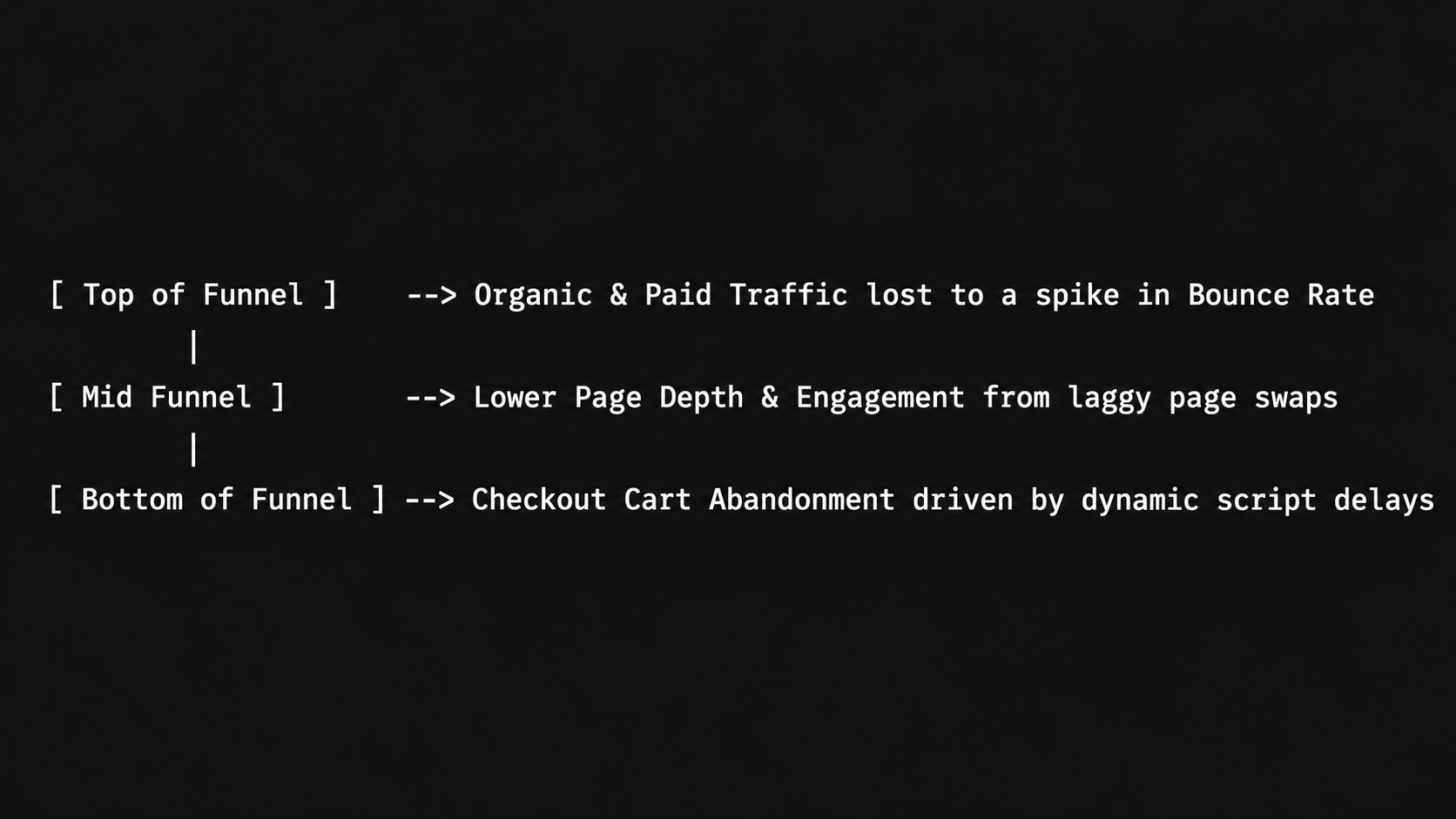
To understand how website speed hurts your business, look at how lag affects visitors as they move through your marketing funnel. Latency creates friction at every touchpoint, reducing overall yield.
Top of Funnel: High Bounce Rate and Wasted Ad Spend
Marketing campaigns spend significant capital driving traffic through SEO and paid ads. However, if a landing page takes several seconds to render above-the-fold content, visitors leave before seeing your value proposition.
This causes your bounce rate to skyrocket while inflating your cost per acquisition. You pay for ad clicks regardless of whether the user stays long enough for the page to render.
Mid-Funnel: Poor Engagement and Reduced Page Depth
Visitors who survive the initial page load still face cumulative friction during site navigation. In e-commerce and media setups, growth relies on page depth — how many products or articles a user views per session.
When page transitions lag, browsing behavior cools off. Users explore fewer items, add fewer products to their cart, and spend less time engaged with your brand. A smoother, latency-free journey is just as much a CX design problem as it is a performance one.
Bottom of Funnel: Cart Abandonment at Checkout
The most expensive fallout occurs at the point of purchase. Checkout pages carry heavy technical loads: tax calculators, inventory checks, address validation, and third-party payment gateways.
When a customer sees a spinning wheel after clicking "Place Order," anxiety spikes. They worry about double charges or technical glitches, causing them to close the tab and abandon the purchase entirely.
Beyond Sales: The Technical Cost of Poor Web Performance
A slow site does more than frustrate human visitors. It actively harms your visibility on search engine result pages through explicit performance standards.
Google evaluates user experience using Core Web Vitals — a standardized set of performance metrics that directly inform its algorithm. Failing these checks triggers an organic SEO ranking penalty, shrinking your top-of-funnel traffic.
- Largest Contentful Paint (LCP): Measures perceived loading speed by timing when the main content element renders.
- Interaction to Next Paint (INP): Evaluates site responsiveness when users click, tap, or type on the page.
- Cumulative Layout Shift (CLS): Tracks visual stability by measuring unexpected layout jumps during page load.
If your site fails these metrics, search engines suppress your content in favor of faster competitors, multiplying your traffic losses.
Action Plan: Practical Steps to Boost Web Performance and Conversion Rates

Improving website speed requires coordinated efforts across engineering, marketing, and design teams. Follow this simple guide to systematically eliminate performance bottlenecks.
Step 1: Optimize Media Assets
Images and videos usually account for the vast majority of transferred page bytes.
- Use Modern Formats: Convert legacy PNGs and JPEGs into modern WebP or AVIF formats for lighter payloads.
- Implement Responsive Images: Use srcset attributes to deliver correctly sized images based on the user's screen size.
- Apply Lazy Loading: Add native loading="lazy" tags to prevent off-screen visual assets from blocking the critical render path.
Step 2: Audit and Streamline Third-Party Scripts
Marketing tags, analytics trackers, retargeting pixels, and chat widgets place heavy demands on the browser's main thread. Keeping this clean is an ongoing website maintenance discipline, not a one-time fix.
- Conduct Tag Audits: Regularly audit your tag manager to remove legacy or duplicate tracking scripts.
- Defer Non-Critical Code: Load non-essential scripts asynchronously using async or defer attributes.
- Use Web Workers: Offload non-UI tasks to background threads so main-thread interactions remain smooth.
Step 3: Implement Edge Delivery and Caching
Reducing physical network distance between your origin server and visitors improves load time significantly.
- Deploy a Global CDN: Cache static assets at edge locations close to your end users.
- Optimize Server Response: Streamline backend database calls and dynamic API routes to improve Time to First Byte (TTFB).
Take Control of Your Web Performance
Maintaining website speed is an ongoing operational discipline, not a one-time dev project. As new features, ad pixels, and design updates launch, latency can easily creep back in. By tracking speed as an essential business KPI, running regular performance testing, and evaluating performance alongside revenue metrics, you protect margins and deliver the frictionless experiences modern buyers demand.
Frequently Asked Questions
How does website speed directly affect my conversion rate?
Site speed reduces friction across the user journey. Faster page loads keep visitors engaged, decrease bounce rates, and prevent checkout drop-offs, directly boosting overall conversion rates.
What is a good threshold for page load time?
An ideal page load time is under 2.5 seconds for Largest Contentful Paint (LCP). Any load time over 3 seconds dramatically increases the probability that a user will leave.
How do third-party scripts degrade web performance?
Third-party scripts like marketing tags, chat widgets, and analytics tools block the browser's main thread. This delay prevents elements from rendering quickly and causes input lag during user interactions.
What are Google Core Web Vitals and why do they matter?
Core Web Vitals are specific metrics (LCP, INP, and CLS) that Google uses to measure loading speed, interactivity, and visual stability. Meeting these benchmarks helps avoid search ranking penalties and improves organic traffic.
Step Up Your Site Performance with GStar
Is latency hurting your conversion rate? Partner with GStar to audit your technical stack, fix performance bottlenecks, and protect your digital growth.